Pages

Search This Blog

Monday, April 11, 2016

Twin Cities Start Up Weekend EDU 2016-The Pitch- Part 2-

After making a pitch at Start Up Weekend, we could lobby or pitch for votes. I had a few sticky note votes on my poster, but not as many as other posters as I looked around. In the pictures below, you can see me selling my pitch to other participants. 


The people in the picture above are part of the group of participants whose pitches got the most votes. As you can see, I am not in this picture. My pitch had a few votes, but not enough to make the top 10.  Stay tuned to find out what happened next!


Friday, April 8, 2016

Google Expeditions


Last week we were lucky enough to try Google Expeditions. 
We had access to different types of viewers
             

Our students were able to explore the world from the bottom of the ocean to the moon! Teachers were able to pick from over 100 field trips and tie previous learning experiences to their Google Expedition experience. 


Students had time to explore images on their own and  we were able to focus their attention when needed. The software had built-in points for images with more information.  A teacher could simply touch a pin to focus the class. Students could follow an arrow on their device to focus where the was directing them. The teacher could read more information about that location to the class. 

It was a great experience for both students and teachers. I am excited for the future of this program and look forward to getting it in the hands of more students!


Sunday, March 13, 2016

Twin Cities Start Up Weekend EDU 2016 - Introduction to Ermarie - Part 1


It was a blur of a weekend. We started Friday night at 5:30pm with the opportunity to pitch an idea. Then, moved into forming teams to create projects around popular pitches and ended with a presentation of the final products on Sunday evening at 6pm. 

After years of asking other people if they had a solution or could create a solution, I finally took care of it! 

What is the solution for? As a teacher in Minnesota, I need to attend 125 hours of Professional Development (PD) every five years. I also need to attend PD on five different topics. With a June 30th deadline, I need to turn in all of my documents to the state of Minnesota to renew my license. 

For the last eight years, I have kept all of my documents in a file folder or three ring binder. Even though I would try to stay organized and keep a running total of my hours, it would always turn into a mess that would require hours of organization and compilation in order to turn it in. 

As a person who is pretty interested in technology, I turned to cloud storage options to try and help with this mess. While I didn’t have a problem with the options I tried, they just were not created for this situation. I always thought: “Wouldn’t it be nice to have a place that I could organize and save all of my documents somewhere online that I am in control of?” 

I look forward to sharing more information with you about Ermarie (the name has changed from DigiDocs during startup weekend to now Ermarie). Ermarie will help you easily save your documents to your own online secure storage space. Documents can be uploaded from your computer or captured with the camera on our phone. When the time comes to share your documents, you have the ability to easily share a link with a time limit that you set. 

The two qualities that make this program stand alone from other options are ease of use and ownership. A key feature of Ermarie is that you are the owner of the information, the information follows you wherever you go. I look forward to sharing more of Ermarie's details with you! Try it out www.ermarie.com and then PLEASE give me your feedback!! We are in the very early stages of sharing this great app with people and are eagerly awaiting your feedback!!  bit.ly/ermariefeedback


The team behind DigiDocs (now Ermarie) and one of our mentors Eric Nelson https://twitter.com/FANgeopolitics celebrating after a long weekend!

Tuesday, February 23, 2016

Google Drive Bingo for Beginners

Tonight I will be leading a Community Education class on the topic of Google Drive for beginners.

Planning for tonight my goals include

  • How to access Google Drive
  • Introduction to Google Drive
  • Creating, accessing, and sharing Google Docs
  • Finding items that were shared with you


Instead of reinventing the wheel, I will be sharing Kasey Bell's Google Drive and Google Doc Cheat Sheets. You can find them here. You can find her on Twitter @ShakeUPLearning .


As a way to wrap up class and check for understanding, I am borrowing Alice Keeler's Bingo Board. You can find her on Twitter @AliceKeeler . Here is her blog post and template. Here is my version of the Bingo boards with the "I can" statements I am hoping my attendees will walk away from class with. 

Monday, February 15, 2016

Presidents Day 2016

Today I am one of many teachers who won't be at school working, many of us are at home working. Today is Presidents Day. 
Here is a list of what I will be doing today, what are you doing?


1. While drinking coffee and watching the morning news, I am scrolling through a recap of the Twitter chat #MNlead that happened last night.


2. I recently found theducationcalendar.com which is a crowdsourced, searchable map and calendar of education events around the world. If you haven't seen it yet, I would recommend checking it out and adding events to it!


3. Have you attended a free day of learning around computer science in elementary education? If you haven't, I invite you to join me at any of my upcoming Code.org workshops! Learn more about the at bit.ly/codewithangiews


4. I am preparing my presentation on Formative Assessment tools for this Wednesday. I get to have an hour with new educators to share a few best practices and have a discussion around what they are doing and what they would like to do . Do you have any tools you love and want to share?


5. I am working on finding funding for my trip to ISTE 2016! I will be speaking at the conference. I have applied to be a volunteer and have received a scholarship from CMLE (Thank you!!) Any suggestions for other places to look?


6.Working on the last few finishing touches for my MN iOS Summit presentation on why and how kids can code in your elementary classrooms. I think pictures speak louder than words, do you have any pictures you love and would be willing to share with me? I am looking for students who are working through any computer science lessons, with or without technology.


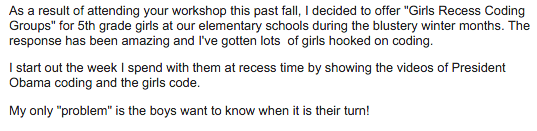
7. Checking email. It seems as though it is a never ending task! It is a great treat to get emails like the following.   I love to hear how people are implementing their learning and of their "problems." This is a great problem to have! Do you have a story to share? Feel free to email me kalthoff@pd.code.org


Now it's time to refresh my coffee cup and continue on with my to-do list. The first thing will be to check in with EdSurge  and see if they have anything about theeducationcalendar and if not I will share it with them!
Friday, January 29, 2016

Free Music You Can Download!!

Have you ever found yourself searching for music that you can use in a video project? What about your students? I know I have!!! I would like to give a Shoutout to Jim Sill for this tip:


Go to :

https://www.youtube.com/audiolibrary/music

to browse and download free music for your projects!

Thursday, January 28, 2016

Inserting Text Boxes into Google Docs

As I was setting up a Google Hangout On Air today, I came across a Google+ post from Eric Curts. He explains how to insert a version of a text box into a Google Doc. Currently, inserting a text box is not an option, but inserting a Google Drawing is an option. Here is his video explaining how to do it!! It's a great tip that I have never thought of!


Click here to access his blog post.